Paid Client Project
How I turned photos of a restaurant menu into a live client website.
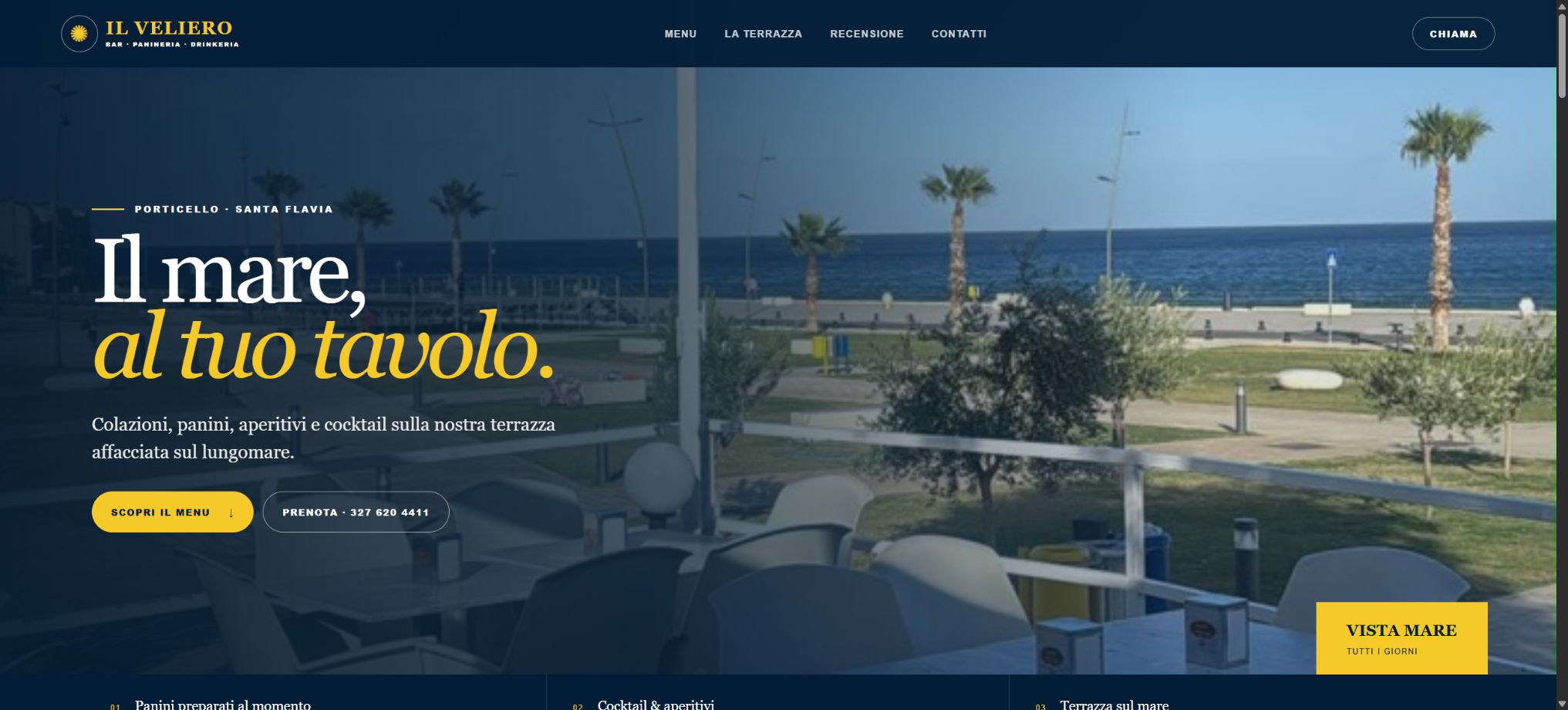
I was contracted to create a customer-facing website for Il Veliero in Porticello, Italy. The starting materials were photographs of the printed menu and the waterfront venue—not design files, spreadsheets, or structured content.

Project visuals

Project video
I explain how I moved from photographed source material to a structured, responsive client website in this short project overview.
The brief
The assignment was practical: make the establishment easier to discover and easier to understand from a phone. Visitors needed a clear menu, directions, a direct way to leave a Google review, and a simple link that could be shared at the restaurant. The finished product also needed a professional domain instead of a temporary platform address.
Because this was paid client work, I treated delivery details as part of the build. The website, repository, custom domain, DNS, review link, and QR code all had to work together as one usable system.
Starting with photos instead of files
The original menu existed as photographed pages with printed categories, ingredient descriptions, and handwritten prices. I used image-based extraction to establish a first draft, then manually reviewed the photographs against the extracted content. That second pass mattered because reflective laminate, page angles, handwriting, and overlapping views can all create errors.
I organized the information into consistent categories such as coffee, soft drinks, appetizers, sandwiches, salads, beer, cocktails, and spirits. Where the source material was incomplete or unclear, I stayed within what the photographs supported instead of inventing missing details.
Turning visual material into structured content
A photographed menu is readable to a person, but it is not yet reusable web content. I converted the visible information into structured data that the interface could render consistently. That made item names, ingredients, categories, and prices easier to maintain while keeping the design responsive.
The nautical identity came directly from the source: navy blue, warm yellow, rope and maritime details, the Il Veliero name, and waterfront imagery. The goal was not to copy a worn physical menu page pixel for pixel. It was to translate the establishment's recognizable character into a cleaner digital experience.
Designing for customers on phones
Restaurant visitors often open a menu while walking, deciding where to eat, or sitting at a table. I built the page around that mobile use case: readable type, clear category navigation, focused item cards, useful spacing, and prominent customer actions.
The venue photographs also gave the site a sense of place. They show the terrace, sea, palms, and Porticello waterfront, connecting the digital menu to the actual experience customers can expect.
Reviews, directions, and the QR code
I added a direct Google review action using the establishment's Google place identifier rather than a general map search. I also provided a map link for directions. Those are small features, but they reduce friction at two important moments: finding the business and responding after a visit.
The downloadable QR code points to the final custom domain and was generated as a clean, square asset for print or tabletop display. Scanning it takes a guest directly to the live site without typing an address.
Publishing and custom-domain delivery
I maintained the source in a public GitHub repository, published the site, connected ilvelieroporticello.com, and configured the required DNS verification and routing records. SSL became active after the domain records propagated.
This project demonstrates a workflow I can repeat for other small businesses: begin with imperfect real-world material, verify it, organize it, design around the customer journey, and deliver a professional public destination.
Project links
Visit Il Veliero Porticello · Review the GitHub repository · See the portfolio entry