Project evidence - Accessibility - Technical communication
How I build an accessible project case study from real evidence.
I start with the files, screenshots, links, and limitations that I can verify. The writing comes after I understand what the project actually proves.
A case study should help someone verify the work
A project case study is more than a polished summary. It should help a recruiter, developer, client, or collaborator understand the problem, my role, the current status, and the evidence behind the technical claims. Before I write one, I review the project files and the public material that already exists.
That review keeps the story grounded. A repository can confirm a framework, route, component, test, or database choice. A public page can confirm what is currently available. A screenshot can show an interface state. None of those sources should be stretched into claims about users, revenue, rankings, or results that they do not prove.
I build an evidence inventory first
My first pass is an inventory: project purpose, status, source repository, public URL, screenshots, technology, implementation notes, and known limitations. I also note which statements are supported by code and which come from my direct project experience. This makes gaps visible before they become vague paragraphs.
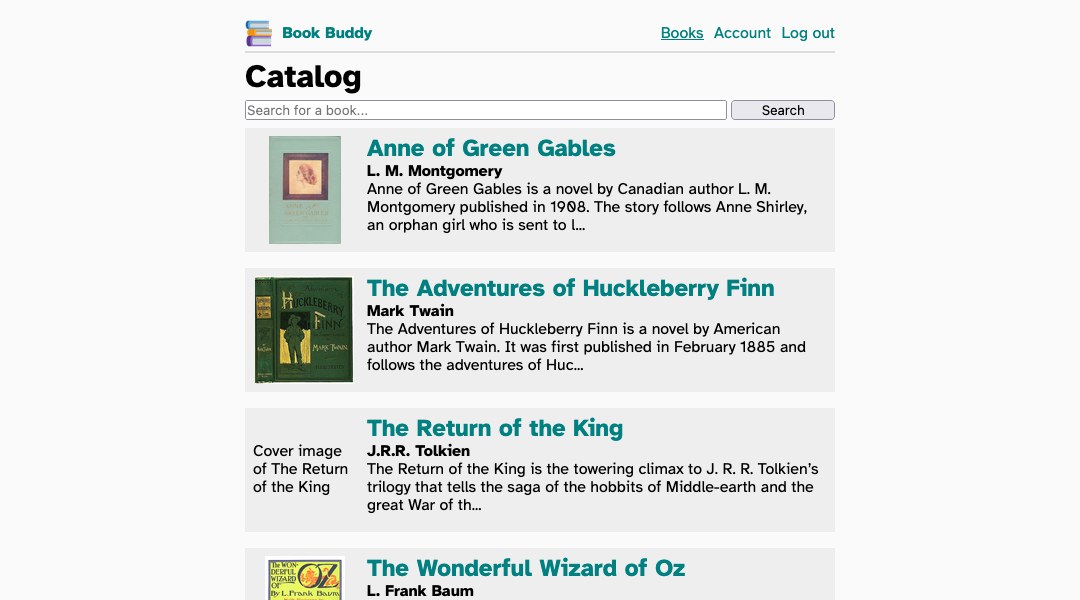
For example, Book Buddy supports a focused explanation of React, Vite, an external API, and account-related actions because those parts are documented in the project material. I can explain that workflow directly. I do not need to turn it into a larger product story that the evidence cannot support.
Purpose and status come before the technology list
A long list of tools does not explain why a project exists. I begin with the problem or learning goal, then state the project's current status. That context helps the reader understand whether the work is live, in development, a prototype, or coursework.
The status also controls the language I use. A live page needs a working destination. An in-development project needs a clear boundary between current work and future plans. Coursework can demonstrate meaningful technical decisions without being presented as a commercial production system. I use the same approach across my verified projects page so the labels and links agree.
Accessible structure makes technical evidence easier to scan
I organize the page around one clear H1 and descriptive section headings. Each section should answer one question: What problem did I address? What did I build? What evidence supports the claim? What did I learn? What remains incomplete? This structure helps every reader, including someone using headings to navigate quickly.
Links also need meaning outside the surrounding sentence. I use labels such as “review the Book Buddy repository” or “read the API workflow notes” instead of repeating “click here.” Descriptive links make the destination clearer for keyboard and screen-reader users and help sighted readers decide what to open.
Screenshots need a job, not just a place on the page
I select a screenshot because it proves or clarifies something specific. A project interface can show a search result, navigation state, responsive layout, or booking handoff. The caption explains why that image matters. The alt text describes the meaningful visual content without repeating the caption or loading it with search phrases.
I also include the image dimensions in the HTML so the layout reserves the correct space before the file loads. That reduces visual movement. I use a sufficiently large source image for social previews, verify that the image URL returns successfully, and keep the visible crop readable on narrow screens.
Code evidence and reader context have different roles
The repository can establish what is in the implementation, but a case study still needs to translate that evidence for a reader. I explain the connection between a component, API route, authentication decision, or data model and the problem it addresses. I avoid pasting large blocks of code when a short explanation and a repository link communicate the point better.
This is where technical writing becomes part of development. The goal is not to make the work sound more complex. The goal is to show that I can inspect a system, document it accurately, and explain the decisions in plain language.
Limitations make future work more useful
A credible case study identifies what it does not establish. A prototype does not prove production traffic. A screenshot does not prove accessibility by itself. A successful local workflow does not prove long-term reliability. Stating those limits helps me separate completed evidence from a future improvement list.
That distinction also improves project planning. Instead of writing broad promises, I can name the next verifiable task: test a narrower viewport, improve keyboard behavior, add error handling, validate a public deployment, or update documentation after a material change.
My practical case-study checklist
- Confirm the project purpose, my role, and its current status.
- Verify technology claims against the repository or project files.
- Use one H1 and descriptive headings in a logical order.
- Select screenshots that demonstrate a specific part of the work.
- Write useful alt text, captions, link labels, and image dimensions.
- Connect the case study to the relevant project and source repository.
- State limitations without turning unverified plans into features.
- Test the final page, links, metadata, and public image URLs.
My field-operations work reinforces this process. Documentation, reliable systems, and clear communication matter when someone else needs to understand what happened and what comes next. I bring that same discipline to software projects and the way I present them.
Review the project evidence
Explore my project portfolio, see the source repositories on GitHub, or read more software-development and field-operations notes.